
Deploy Angular App using Nginx

1. Overview

Assuming that you have finished developing your Angular app, and it’s time to deploy it in a real web server (production server for example).
In this article, I will show you how to build and deploy your Angular app in a production server using Nginx web server.
Nginx is a lightweight web server (1.38MB), it’s easy to install and to configure.
2. Implementation
2.1. Build Angular app
1. First of all, build your Angular app for production, using ng build command.
ng build --prod --base-href="/"- –prod : To optimize the generated bundles (minification, uglification,…).
- –base-href : To designate context path a for your application.
2. If everything goes well, a app/dist folder contains the generated resources will be created.

2.2. Install Nginx
Download and unzip Nginx somewhere in your production server.

2.3. Config Nginx
1. Open the ../nginx-1.13.8/conf/nginx.conf, and add the following script inside the http { … } section.
server {
        listen       9090;
        server_name  localhost;

        location / {
            root   html;
            index  index.html index.htm;
			try_files $uri $uri/ /index.html;
        }

        error_page   500 502 503 504  /50x.html;
        location = /50x.html {
            root   html;
        }
    }
try_files is not necessary if you are using hash location strategy.
2. Navigate to ../nginx-1.13.8/html, and copy inside it all the generated files from app/dist folder.
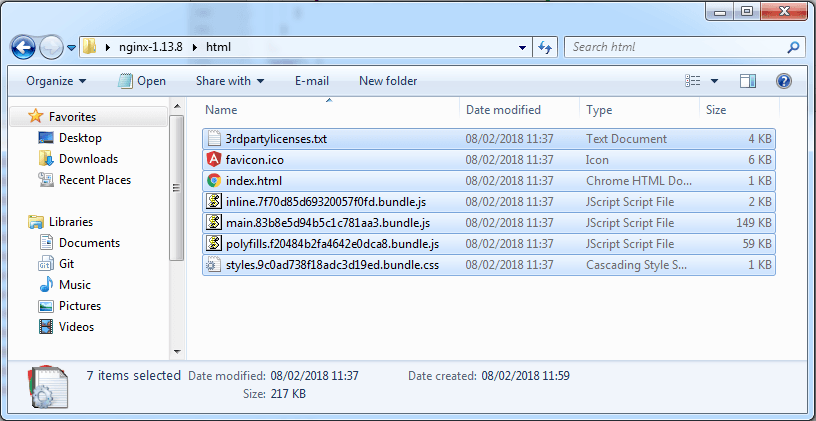
3. Run Nginx server by double click on ../nginx-1.13.8/nginx.exe.
4. Open the localhost:9090 with a browser to see your Angular app up and running.


Solution Architect with 10+ years of experience across full-stack development, DevOps, and enterprise software design. Expert in building scalable architectures, CI/CD pipelines, and internal developer platforms using tools like GitHub Actions, Terraform, Kubernetes (AKS), Azure, and Prometheus. Strong hands-on background in Java, Spring, Node.js, and event-driven systems (Kafka, Mulesoft). Passionate about developer experience, software quality, and platform engineering
how to configure it so that it could be access via the internet from another machine?
A short answer is, you should be able to access it from another machine using the IP address of the host machine, something like
machine-host-ip:9090instead oflocalhost:9090thanks for such a nice explanation.
Finally I’ve found something that helped me. Thank you!
how to configure SSL?
refer to this (how to config https/ssl for Nginx) : http://nginx.org/en/docs/http/configuring_https_servers.html
How to solve Cross origin error while calling to another server api?
You have to enable proxying for your Angular app by adding a proxy.conf.json file
Ref to this article : https://github.com/angular/angular-cli/blob/master/docs/documentation/stories/proxy.md
But this is for the development time work. I am currently wants to deploy my Angular app using Nginx server.
Please dont mind i am new to angular.
It is possible to use proxying at Nginx level too, for example:
location /api/ {

    proxy_pass http://server-url/api/;

}
Ref : https://docs.nginx.com/nginx/admin-guide/web-server/reverse-proxy/